
Best Offline D&D 5e Apps for Players and GMs
Signal drops, game shops with no Wi-Fi, cabins in the woods, commutes underground. There are plenty of reasons the table cannot always rely on a live internet connection. If you play D&D 5e away from reliable connectivity, you need tools that work fully offline. Here is what matters and what the options look like.

Why offline matters at the table
Many popular D&D apps store their content server-side and need a connection to display monster stat blocks, spell descriptions, or rule lookups. In practice, a combat encounter can grind to a halt mid-round because the app is trying to load a page the GM needs right now. It is a frustrating and avoidable problem.
Offline-capable apps download their compendium to the device during setup. After that, everything is available instantly with no network request. This also makes the app faster in general, because local lookups are orders of magnitude quicker than round-trip server fetches.
What to look for in an offline D&D app
Not all "offline" apps are equal. Some cache recent content but silently fail on anything they have not loaded before. Others require an initial download of several hundred megabytes. A few only work offline for basic features. Before you commit, check these specifics.
- Full compendium offline: all official SRD content, not just the subset you happened to look up last week.
- No login required offline: if you forget to refresh a token before a session in a dead zone, you should not be locked out.
- Combat tracker offline: an app that tracks HP and initiative by calling a server is not truly offline.
- Fast local search: "giant spider" should return in milliseconds. SQLite-backed apps with pre-built indexes beat apps that scan flat files.
How the popular options compare
The ecosystem has several well-known choices, and they trade off differently once the signal is gone.
| App | Full compendium offline | Encounter tracker offline |
|---|---|---|
| D&D Beyond | Only content loaded previously | Needs a connection |
| Questweaver | Yes, full SRD on device | Yes, fully local |
D&D Beyond is the official digital toolset, with deep content and polished UX, but offline access is limited to what you have already loaded and key features need a subscription and a connection. It shines for at-home play with reliable Wi-Fi.
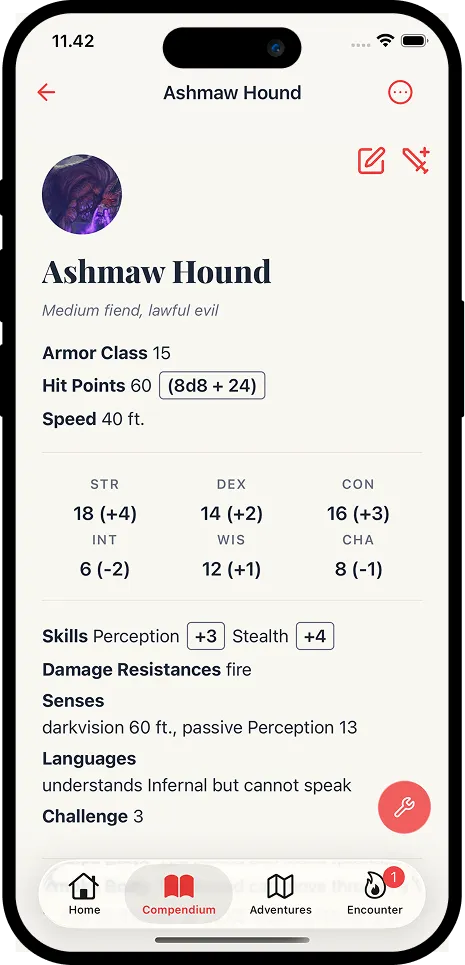
Questweaver keeps the full SRD monster compendium on device, with no subscription and no login after setup, and runs the encounter tracker, initiative, HP, and conditions entirely locally. It does not do everything: there are no full rule lookups, homebrew sharing, or deep campaign management. For encounter prep and combat running, though, offline reliability is a core design goal rather than an afterthought.
Tips for any offline setup
Before you leave home
Sync your app's content on a reliable connection, charge your device or pack a battery (a bright screen for four hours drains a phone fast), and keep a screenshot or PDF of any homebrew so it survives even if the main tool cannot reach the internet.
Decide before the session which tool handles which job, and which of them is offline-capable.
One app for character sheets, one for the encounter, one for rule lookups. If you know which of those needs a connection, you also know your fallback before the situation arises at the table.